Safeguarding
A whole-school, child-centred approach is fundamental to all aspects of everyday life at Newberries Primary School. We strive to create a culture which enables children to express their wishes and feelings and feel able to talk to staff about anything that is important to them. We ensure that the welfare of a child or young person is paramount and keep them at the centre in our decision-making when working with them, their families, and those supporting them.
Role |
Name |
| Designated Safeguarding Lead (DSL) |
Anna Traxon Nicola Webster-Smith |
| Deputy Designated Safeguarding Lead (DDSL) |
Anna Traxon Ness Peters |
| Designated Teacher for Children Looked After (DT for CLA) | Jo Baxter |
| Special Educational Needs Coordinator (SENCO) | Nicola Webster-Smith |
| Mental Health Lead |
Ness Peters |
| DSL Prevent Lead |
Nicola Webster-Smith |
| E-Safety Lead |
Jo Baxter |
E-Safety (Under Review)
Computers are a part of everyday life. At Newberries Primary School, we encourage the use of computing for learning, however we pride ourselves in working in partnership with parents to ensure that we keep children safe online. With modern technology, we realise many children are using the internet regularly at home, therefore we have put together some information for parents/carers on how to keep your children safe online.
Here are some things you should do to help your child ‘Stay Safe’ in the online world:
- Read and agree to the schools ‘E-safety agreement for parents and pupils.
- Set ground rules with children and agree which websites / apps they can use. Remember these will vary depending upon the age of your child.
- Agree time limits and regular breaks. Remember, letting children play video games just before bedtime may stop them sleeping and have an impact on their learning.
- Find out how to set the parental controls and safe search. Consider buying parental monitoring / control software for younger children. Remember none of these are 100% effective and supervision is always needed.
- Check the homepage / app information of your child’s favourite game. This will give you an overview of the content and its suitability.
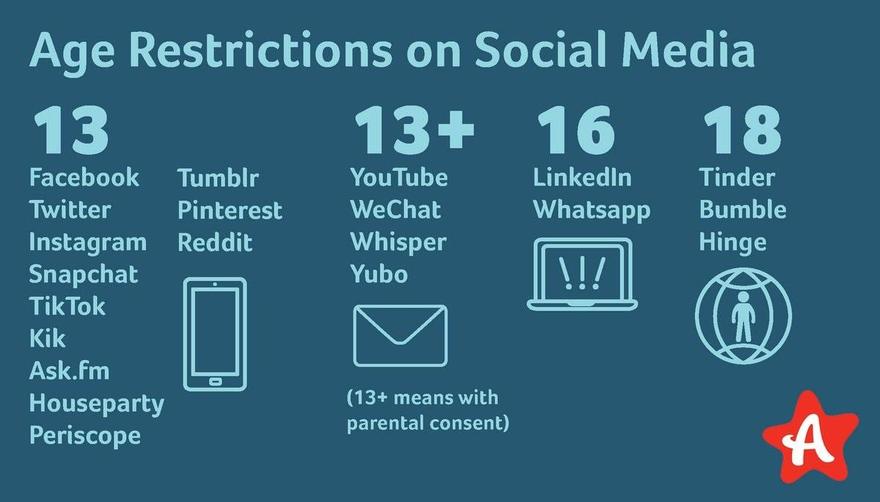
- Use the poster below to check the age restrictions on popular social media platforms and ensure that use of these apps are monitored and used only with parental permission.
- Spend 30 minutes watching your child play an online game so that you can see the content and be happy that it is suitable for them. Again, remember to check the age ratings of games at PEGI and understand that video games ratings are all about the content and not the difficulty of the game.
- Say NO to your child playing any game that has a rating of 15 years and above or using websites that you think are unsuitable.
- Talk to your child about their privacy settings and ask them to show you how to change these settings. Encourage your child to only have online friends they know in the real world.
- Tell your child what to do if they ever feel frightened or scared when online or using their mobile phone. It is important that your child knows they can always talk to you, and you will help them (You may not know the answer, but by talking to the school, other parents, mobile phone provider and so on, you will be able to find a solution).
UNDER REVIEW